Install IPTV on LG Smart TVs Complete IPTV Smarters Pro Guide
Learn how to download IPTV Smarters Pro from the LG Content Store, connect your IPTV subscription, and stream live TV, VOD, and series on any LG Smart TV—all in one walkthrough.
IPTV Smarters Pro delivers a polished interface for watching IPTV channels, movies, and series directly on LG Smart TVs. This guide covers each step—from locating the app inside the LG Content Store to logging in with M3U or Xtream Codes credentials, fine-tuning stream quality, and troubleshooting common hurdles so you can enjoy uninterrupted IPTV viewing.
What you get
Live TV, VOD, Series, and EPG access
Requirements
LG Smart TV + active IPTV subscription
Download IPTV Smarters Pro from the LG Content Store
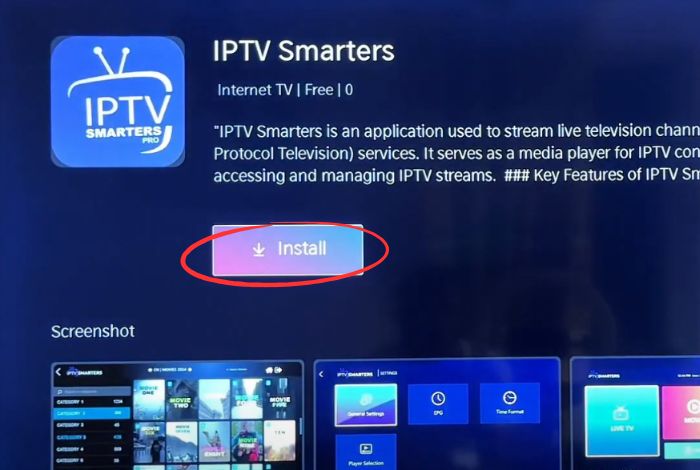
Open the LG Content Store on your TV, search for IPTV Smarters Pro, and install the official listing so you always receive trusted updates and security patches.
- a.Use the LG remote to launch the Content Store from the home bar.
- b.Type "IPTV Smarters Pro" into the search box and locate the official app entry.
- c.Select Install and wait a few seconds for the download to finish.
- d.Find the app in your LG TV app grid so it is ready for launch.
Launch IPTV Smarters Pro and prepare your subscription
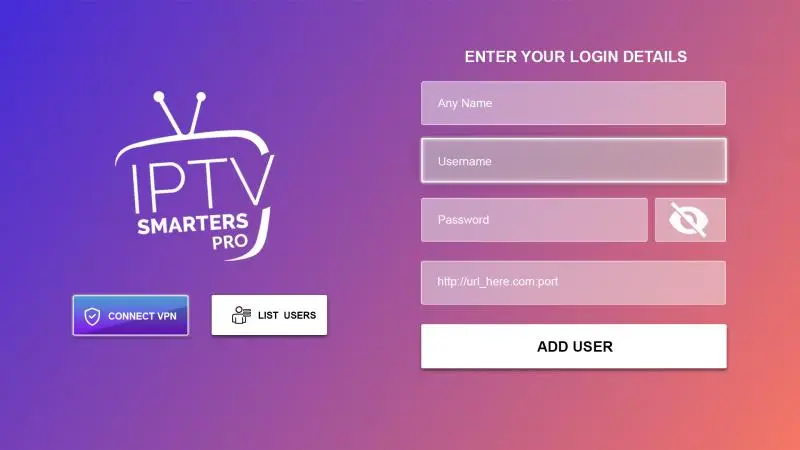
Open the newly installed app from the Apps panel, accept the prompts, and get your IPTV credentials ready. You will need either an M3U playlist URL or Xtream Codes API login to continue.
- Keep your IPTV provider email open so you can copy login details without typos.
- Decide whether you will connect via M3U URL or Xtream Codes depending on what the provider issued.
Enter your IPTV subscription information
Choose the authentication path that matches your IPTV provider, then carefully enter the credentials. IPTV Smarters Pro will validate the connection and sync the channel list automatically.
Option 1: Using M3U URL
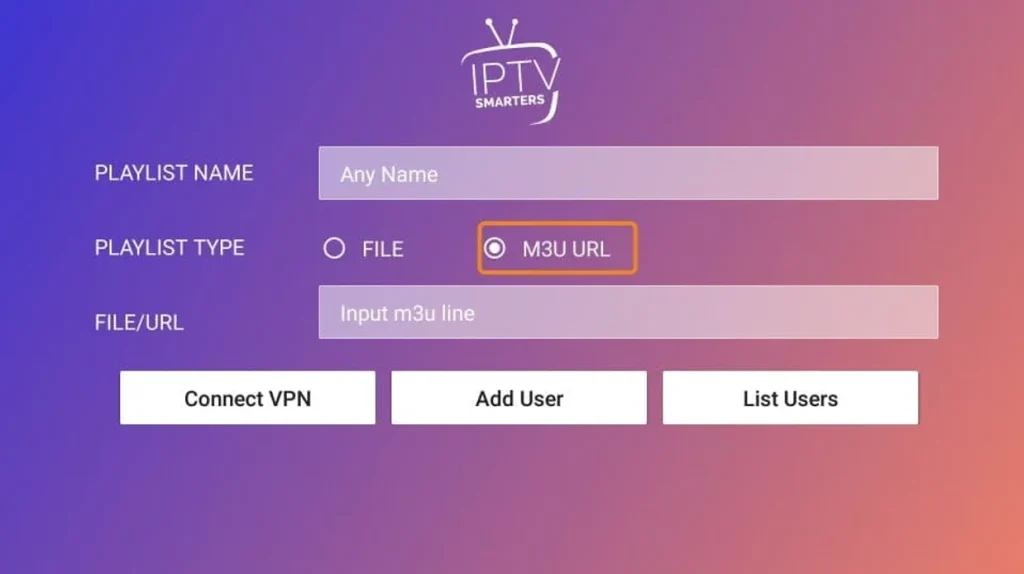
- Select the M3U URL login tile inside IPTV Smarters Pro on your LG Smart TV.
- Paste the exact playlist URL supplied by your IPTV provider (check the dashboard or welcome email).
- Confirm the entry and let the app validate the playlist before proceeding.
Option 2: Using Xtream Codes API
- Choose the Xtream Codes API tile and enter the server/portal URL that came with your subscription.
- Input the username and password exactly as provided (case sensitive).
- Save the profile so IPTV Smarters Pro can connect to your provider and sync the channel list.
Tip: Always copy credentials directly from the provider portal or confirmation email to avoid typos that can block the connection.
Start streaming live TV, movies, and series
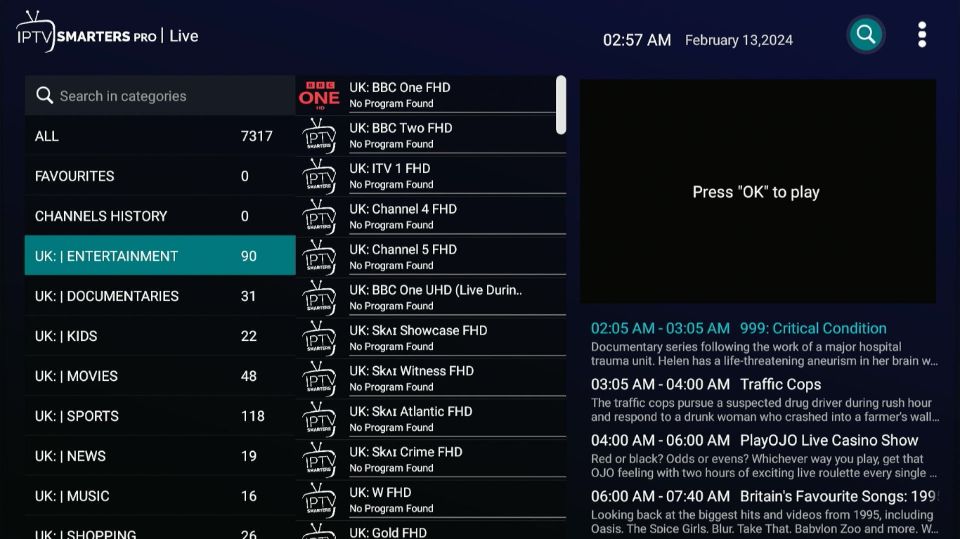
After IPTV Smarters Pro verifies your account, it will load categories for live channels, on-demand movies, TV shows, and catch-up content. Use the LG remote to browse categories, search titles, and bookmark favorites.
Advanced features and pro tips
- •Create favorite channel groups for quick access to sports, kids, or news.
- •Enable the EPG guide so you can view upcoming programming and set reminders.
- •Use hardware acceleration in settings if playback feels choppy.
- •Reduce stream resolution temporarily if you notice buffering on slower networks.
- •Leave extra internal storage free so cached thumbnails and playlists load quickly.
Troubleshooting & FAQ
Where do I find my M3U or Xtream credentials?
Log into your IPTV provider portal, check the playlist or device setup page, review the confirmation email, or reach out to support if credentials are missing.
Can I load multiple IPTV subscriptions?
Yes. Add separate users inside IPTV Smarters Pro for each playlist or Xtream account, then switch profiles from the main screen.
Why does the app fail to connect?
Confirm your subscription is active, verify Wi-Fi speed (3–5 Mbps minimum), double-check credentials, update the app, and restart the TV if needed.
Is the app compatible with Samsung and LG models?
IPTV Smarters Pro runs on most Tizen (Samsung) and webOS (LG) models. Always confirm compatibility in the Smart Hub or LG Content Store before installing.
Can IPTV Smarters Pro work offline?
No. A live internet connection is required to authenticate and stream IPTV content.
Alternative IPTV apps for LG Smart TVs
- •Smart IPTV – streamlined interface with strong M3U playlist support.
- •GSE Smart IPTV – advanced channel controls and parental settings.
- •IPTV Smarters (standard) – lightweight alternative if the Pro build misbehaves.
- •Perfect Player IPTV – customizable layout with granular playlist management.
Conclusion
Setting up IPTV Smarters Pro on an LG Smart TV takes only a few minutes: install it from the LG Content Store, launch the app, enter your IPTV credentials, and start streaming. Keep the app updated, maintain a reliable IPTV subscription, and leverage the advanced features outlined above for the smoothest possible viewing experience.